flowchart LR 1[_quarto.yml] 2[.qmd files] subgraph 3[the _site directory] 4[.html files] 5[all the css and js stuff] end 1 & 2 --> 3
Showing off your cartographic and scientific work doesn’t need to be hard.
If you’re just watching, or reading this later:
An open-source scientific and technical publishing system
quarto createquarto create
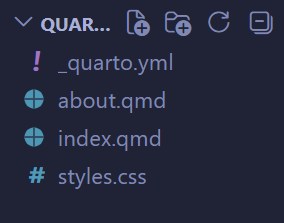
_quarto.ymlThis is the master config file. Changes here will apply to the entire site.
quarto preview
flowchart LR 1[_quarto.yml] 2[.qmd files] subgraph 3[the _site directory] 4[.html files] 5[all the css and js stuff] end 1 & 2 --> 3
You can leave the preview terminal running. As you make changes to the files in your project, it will automatically refresh the page.
.qmd file = 1 website pageAll formatting, images, layout options, etc., are simply part of the text.
Read Quarto’s Authoring guide for all the details.
If you’re following along: all portfolio content is available in the Quarto Portfolio Workshop code repo!
You can use those files to create a sample portfolio, or swap in files of your own.
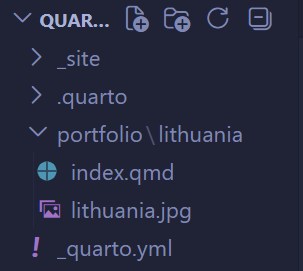
portfoliolithuaniaindex.qmd in that folder
“Front matter” is a small section of YML at the top of a markdown document that provides metadata.
At the very beginning of the new file, add the following details:
Below that, you can enter whatever other details you wish, following markdown conventions.
Don’t forget your map!
Create another folder in the portfolio directory, with an index.qmd in it.
Call it world. Paste the following:
---
title: Nova et Aucta Orbis Terrae Descriptio ad Usum Navigantium Emendate Accommodata
subtitle: New and more complete representation of the terrestrial globe properly adapted for use in navigation
date: "1569-08"
description: Originally printed across 18 sheets, presented here as a single composite image.
---
# The Map
:::{.column-page}

:::about.qmdGenerated automatically by Quarto, but there’s not much here.
For a portfolio, let’s put a little bio in here.
My name is Gerardus Mercator. You may know me for my widely (and unjustly!) hated map projection, but I did a lot more than exaggerate the poles!
# Education
## 's-Hertogenbosch: *1526—1530*
Studied Bible, Latin, logic, rhetoric.
## University of Leuven: *1530—1532*
Graduated Magister in 1532
# Acheivments and Experience
- Apprenticed to Gaspar van der Heyden
- Engraved terrestrial globe of Gemma and Gaspar Van der Heyden (1536)
- Produced many award-winning globes and maps
- Developed theory of magnetism
# Fun Facts
I really did wear that funny hat! It was quite the fashion at the time.
I coined the term "atlas"!In the front matter, include the item about with the following details:
Quarto will render the page using a special template!
index.qmdLet’s replace the placeholder text of the root-level index.qmd with a listing.
In the front matter:
type, to change to a grid or tablefields, to customize metadata fields shownfield-display-names and date-format to change appearancecontents, to only list specific files / folderssort-ui, to let users sort your listingfilter-ui, to let users search / filter your listingAnd more!
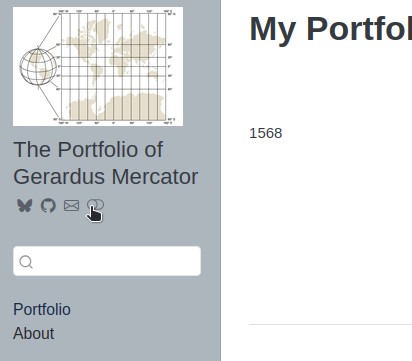
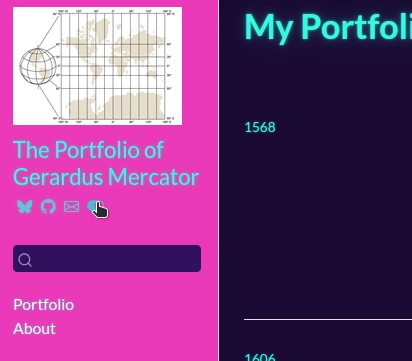
_quarto.ymlThe top bar is fine, but you might try a sidebar.
There’s usually more horizontal space on the screen than vertical, anyway.
Replace the navbar section under website with this:
sidebar:
title: "The Portfolio of Gerardus Mercator"
style: docked
search: true
logo: logo.jpg
background: secondary
tools:
- icon: bluesky
href: https://bsky.app
- icon: github
href: https://github.com
- icon: envelope
href: https://gmail.com
contents:
- text: "Portfolio"
href: index.qmd
- text: "About"
href: about.qmdquarto render_site directory_site directory to root directory of web hostPrerequisites: web host and domain
quarto publishQuarto can publish directly to the web!
Important
You may need to change the output-dir setting to a platform-specific name, depending on the destination.
Surround your text with ``` and an optional language designator to render your code!
Includes syntax highlighting, copy button, line numbers, and annotations.
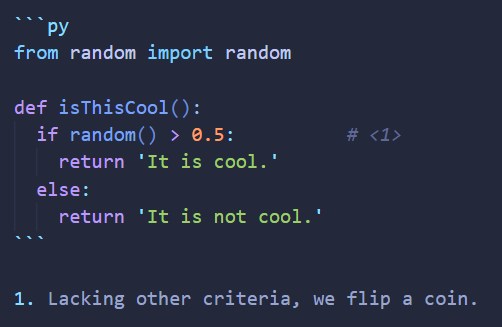
Put curly braces around the language. Quarto will execute your code during document rendering!
Slides rendered at Sunday, October 18 2026.
It is not cool.
Code comes from MatPlotLib examples.1
```{python}
#| code-fold: true
#| fig-cap: A random scatter plot
#| fig-alt: A scatter plot of dots in varying sizes and shades of blue
import matplotlib.pyplot as plt
import numpy as np
plt.style.use('_mpl-gallery')
# make the data
np.random.seed(3)
x = 4 + np.random.normal(0, 2, 24)
y = 4 + np.random.normal(0, 2, len(x))
# size and color:
sizes = np.random.uniform(15, 80, len(x))
colors = np.random.uniform(15, 80, len(x))
# plot
fig, ax = plt.subplots()
ax.scatter(x, y, s=sizes, c=colors, vmin=0, vmax=100)
ax.set(xlim=(0, 8), xticks=np.arange(1, 8),
ylim=(0, 8), yticks=np.arange(1, 8))
plt.show()
```
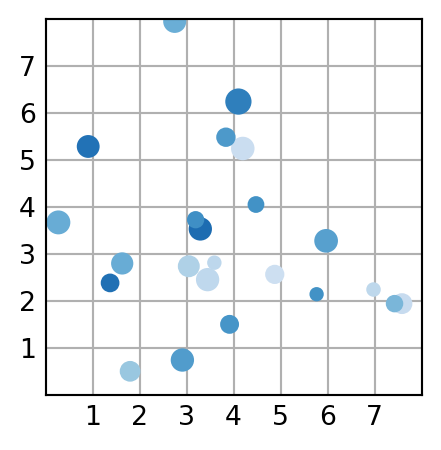

There’s way too much to cover in one workshop. But here’s a quick sampler:
Questions?